

Recently, I came across a feature in Rapido that says:
“X of Y captains didn’t accept your ride.”
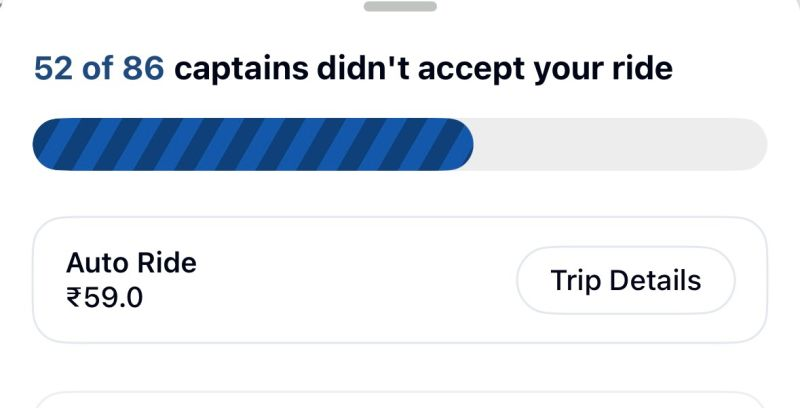
At first glance, this may look like a harmless progress update.
Maybe even a transparency feature.
Maybe an attempt to show the user that the system is actively trying.
But as a Product Manager, my immediate reaction was:
Did the user really need to see rejection quantified like this?
Because there is a big difference between:
“Finding you a ride…”
and
“52 people already said no.”
That difference is not functional.
It is emotional.
And product experiences are rarely just functional.
Why this feels wrong from a user experience lens
Booking a ride is usually not an aspirational action.
It is a utility action.
A user is not opening Rapido to explore.
They are opening it because they need to get somewhere.
Often urgently.
Often while tired.
Often while stressed.
Often when they have very little patience left.
Now place this feature in real life.
Use case 1: The employee rushing to work in the morning
Morning itself is already a pressure cooker.
You are getting late.
Traffic is unpredictable.
You are mentally preparing for meetings, deadlines, and a long day ahead.
At that moment, the last thing you want on your screen is a quantified reminder that dozens of people have already not accepted your request.
Your morning motivation is already:
survive traffic.
The app adds a bonus challenge:
survive Rapido rejections.
This is not merely a status update.
It creates friction in an already fragile emotional moment.
Use case 2: The exhausted employee heading home after work
After a long day, users seek relief, not resistance.
They want the fastest possible path from office to home.
If the app starts surfacing rejection counts, it can amplify exhaustion rather than reduce it.
At that point, the user is not evaluating marketplace dynamics.
They are asking a very simple question:
“Will I get home soon or not?”
Everything else is noise.
Use case 3: The emotionally vulnerable user
Now think of someone who is already emotionally low.
Maybe they had a terrible day.
Maybe they just had an argument.
Maybe they are carrying heartbreak, anxiety, or overwhelm.
They book a ride to get home.
And the app tells them that multiple captains have not accepted them.
Of course, rationally, the rejection is not personal.
It is supply-demand logic.
It is route mismatch.
It is captain preference.
It is pricing.
It is pickup inconvenience.
But user emotions do not process dashboards rationally in the moment.
A transactional rejection can still feel like rejection.
That is where product design has to be more empathetic than literal.
So why would a PM still build this?
To be fair, features like this are usually not built without intent.
There must have been a product hypothesis behind it.
Here are a few likely reasons the PM team might have considered:
1. To create transparency
The team may have believed that showing users how many captains were pinged and how many did not accept would make the process feel more honest.
Instead of making the user wonder whether the app is broken, the feature explains that the system is working behind the scenes.
2. To reduce uncertainty during wait time
Waiting with no feedback can be frustrating.
A progress indicator with numbers may have been intended to reassure users that the request is actively being matched.
3. To shift blame from platform to marketplace dynamics
This feature subtly communicates:
“We are trying. The issue is captain acceptance, not system inactivity.”
That can protect platform trust in one way, but it can also transfer frustration elsewhere.
4. To encourage alternate behavior
Maybe the team wanted users to:
- wait longer
- switch vehicle category
- increase fare tolerance
- choose a different pickup point
- understand why bookings take time in peak hours
So the feature may have been designed as a behavioral nudge.
But here is the problem
Transparency is not always the same as good UX.
A good product does not merely reveal the truth.
It reveals the truth in the right way, at the right time, with the right emotional framing.
This feature may be operationally transparent, but emotionally careless.
And that distinction matters.
Who might have been the target audience?
If I had to guess, this feature may have been designed for:
Primary audience
Users who experience long matching times and might otherwise assume the app is frozen or malfunctioning.
Secondary audience
Power users in high-demand cities who understand ride-hailing dynamics and may appreciate process visibility.
Hidden audience
Internal teams.
Sometimes features like this are not just for users.
They also support internal narratives:
- “We are being transparent”
- “We are educating users”
- “We are reducing support tickets”
- “We are explaining delay reasons”
That is why some features look rational in review rooms but feel cold in real life.
What metrics may have driven this feature?
The PM behind it may have been optimizing for one or more of these:
- Reduced ride booking drop-off during captain search
- Reduced repeat taps or session refreshes
- Lower customer support queries like “Why is no captain getting assigned?”
- Higher trust in search progress
- Better conversion into alternate ride options
- Improved perceived system activity during wait states
- Lower cancellation rates during the matching phase
These are all valid goals.
But the question is:
Did the metric improve at the cost of user emotion?
Because that is where product trade-offs become interesting.
What could success criteria have looked like?
A feature like this may have been considered successful if it led to:
- Lower abandonment during ride search
- Higher completion rate from booking initiation to confirmed ride
- Lower app exits while waiting
- Lower support complaints around “app stuck” or “no captain assigned”
- Improved trust scores in user research
- Better conversion to alternate categories after failed attempts
But I would add another layer of success criteria that is often forgotten:
Emotional success metrics
- Did user frustration reduce or increase?
- Did users feel informed or discouraged?
- Did this message make the wait feel shorter or harsher?
- Did it create confidence or helplessness?
If a feature improves operational metrics but worsens emotional sentiment, it deserves another look.
What risks should have been assessed?
A good PM should have thought through the risk side too.
Risk 1: Rejection framing damages user emotion
The wording makes the user experience feel personal and negative.
Risk 2: Platform perception worsens
Instead of “Rapido is trying hard,” the takeaway may become:
“Nobody wants my ride on Rapido.”
Risk 3: Repeated exposure creates learned distrust
If users repeatedly see high rejection counts, they may stop trying the platform during certain times altogether.
Risk 4: It increases cancellation intent
Seeing dozens of rejections may push users to give up sooner, not wait longer.
Risk 5: Social media backlash
Features that expose friction too literally can become meme material fast, especially when they trigger relatable frustration.
What could they have done differently?
This is where product craft matters.
The issue is not that the app is sharing progress.
The issue is how it is framing the progress.
Better alternatives could have been:
1. Reframe the message positively
Instead of:
“52 of 86 captains didn’t accept your ride”
Try:
- “Searching nearby captains for you”
- “Checking available captains in your area”
- “Still trying to find the fastest match”
- “High demand right now, we’re expanding your search”
Same truth.
Better emotional design.
2. Show action, not rejection
Users care more about what the system is doing now than how many attempts failed before.
For example:
- “Trying more captains nearby”
- “Expanding search radius”
- “Looking for the quickest pickup”
That keeps the interface solution-oriented.
3. Use progressive fallback options
If wait time crosses a threshold, the app can suggest:
- Try Auto instead
- Slightly adjust pickup point
- Check alternate fare
- Retry with priority matching if relevant
Now the user has agency.
4. Test softer transparency
If the team strongly wanted numbers, they could show:
- “Reached out to multiple captains”
- “Still finding the best available ride”
instead of explicit non-acceptance counts.
5. Personalize by context
Morning commute, late-night ride, airport route, or office rush hour may need different language.
Context-aware messaging is far better than one harsh static line.
My broader takeaway as a PM
This feature is a reminder that products are not only systems of logic, they are systems of feeling.
Every screen says something.
Even when it is just showing data.
And in moments of urgency, fatigue, sadness, or stress, words matter more than we think.
As PMs, we often ask:
- Is this accurate?
- Is this transparent?
- Is this measurable?
But we should also ask:
- How does this make the user feel in a vulnerable moment?
- Does this message reduce anxiety or add to it?
- Are we designing for process visibility or human experience?
Because the best products do not just tell users what is happening.
They tell it with empathy.